MCP-Style Orchestration Patterns for Production AI Workflows
A production-focused look at tool orchestration: why MCP-style design matters, which patterns hold up in real systems, and where teams usually get into trouble.
In this article
- Tool orchestration is the real product layer
- What MCP-style design means in practice
- Pattern one: read-only retrieval tools
- Pattern two: workflow command tools
- Pattern three: event-driven tools and pub/sub orchestration
- Pattern four: human-in-the-loop approval tools
- Common mistakes I keep seeing
- Implementation notes from production-oriented stacks
- How I would phase adoption
- Final thought
Tool orchestration is the real product layer
A lot of teams start their AI journey by focusing on prompts and models. That makes sense at first, because the model is the most visible part of the experience. But once a system has to do real work, the center of gravity shifts. The hard problem becomes orchestration: how tools are selected, how context is passed, how policies are applied, and how workflow state is managed across multiple steps.
That is why MCP-style thinking is useful even if your stack is not literally implementing a spec from end to end. The key idea is that models should interact with tools through explicit, structured contracts. Once you adopt that mindset, AI workflows become much easier to reason about, evolve, and secure.
What MCP-style design means in practice
For me, MCP-style orchestration is less about a buzzword and more about a disciplined separation of concerns. The model is responsible for reasoning. Tools are responsible for narrowly scoped capabilities. The orchestration layer is responsible for connecting the two while enforcing context, policy, sequencing, and error handling.
That separation matters because it prevents a common failure mode: business logic leaking into prompts. When every workflow rule is expressed informally in model instructions, small changes become risky. Structured tool contracts keep the system legible.
- Tools have explicit names, arguments, and expected outcomes.
- The orchestration layer decides which tools are available in each context.
- System state lives in services or workflow stores, not only in prompt history.
- Policies and approvals are enforced outside the model.
A small, explicit tool contract is easier to reason about than a generic action endpoint.
{
  "name": "case.assign",
  "description": "Assign a case to an eligible agent queue",
  "inputSchema": {
    "type": "object",
    "properties": {
      "caseId": { "type": "string" },
      "queueId": { "type": "string" },
      "reason": { "type": "string" }
    },
    "required": ["caseId", "queueId"]
  }
}
Pattern one: read-only retrieval tools
The most stable starting point is a read-only tool set. These tools help the model answer questions, retrieve state, or enrich context without changing business data. They are ideal for the first wave of production AI because they provide value quickly while keeping risk manageable.
Good retrieval tools are focused. They do not expose raw system complexity. Instead, they return structured, task-relevant results. The difference is important. A clean retrieval interface makes the model more reliable because it receives data in a shape that supports better reasoning.
Pattern two: workflow command tools
Once retrieval is stable, the next layer is workflow commands. These are tools that move a process forward rather than merely describing it. They can create tasks, trigger automation, assign work, or submit requests to downstream systems. This is where orchestration starts to look more like product engineering than chatbot engineering.
Workflow commands should carry their own guardrails. They need state validation, idempotency where possible, and well-defined responses that tell the agent what changed. I do not want a tool call to say only success or failure. I want it to describe the new workflow state in a structured way so the next step is predictable.
Command responses should return state transitions, not just booleans.
{
  "ok": true,
  "workflowId": "wf_723",
  "previousState": "validated",
  "currentState": "queued",
  "nextAllowedTools": ["queue.status", "queue.reassign"],
  "auditRef": "audit_99ad"
}
Pattern three: event-driven tools and pub/sub orchestration
Some workflows are too distributed to be handled as a simple request-response exchange. In those cases, event-driven patterns become much more useful. This is especially true in customer engagement systems, multichannel platforms, and backend ecosystems where one action fans out into notifications, workflow updates, external integrations, and reporting side effects.
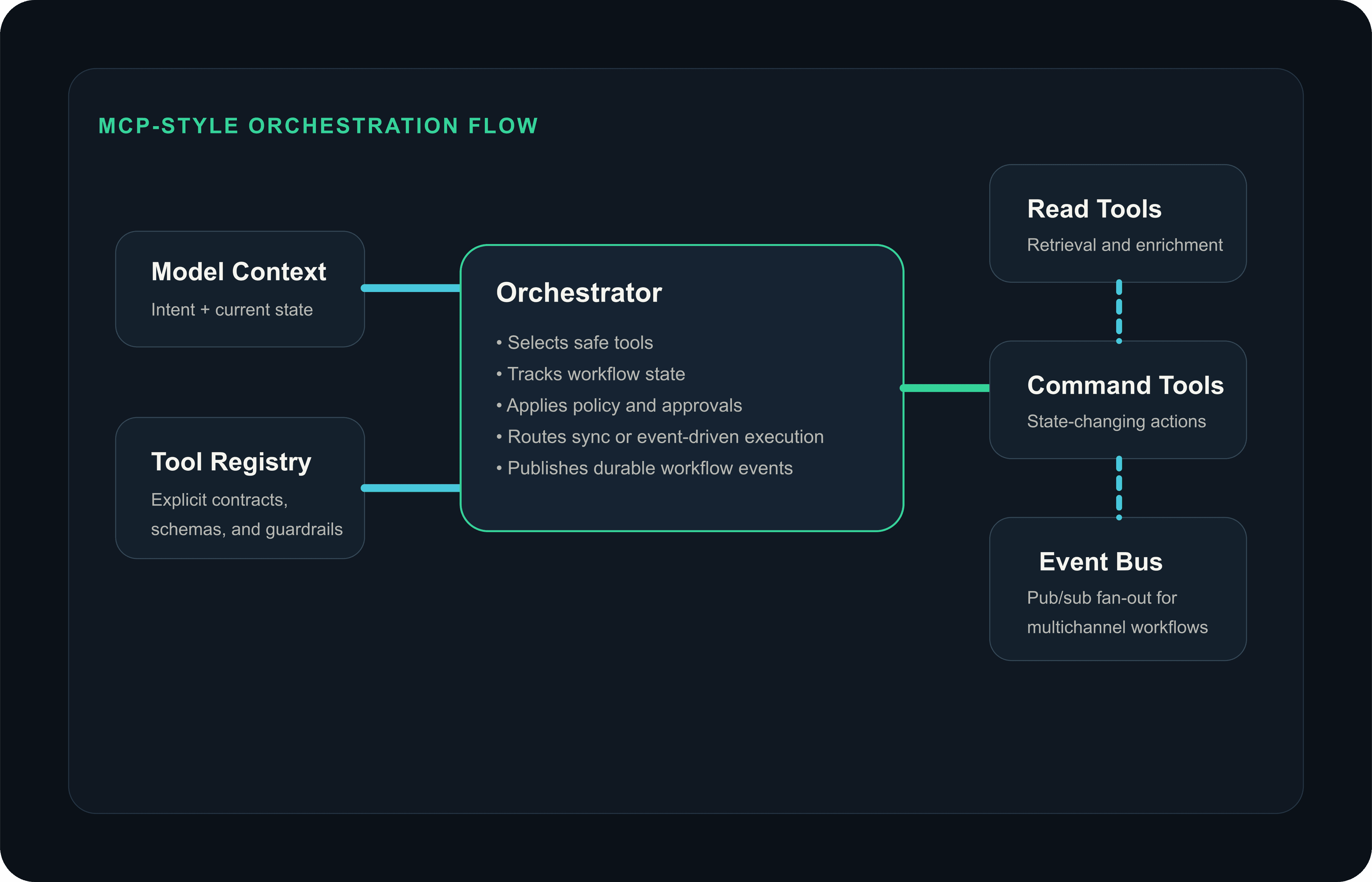
In that kind of environment, I like treating certain tools as triggers into a pub/sub topology rather than direct one-hop calls. The tool initiates intent, the platform emits an event, and downstream services handle their responsibilities independently. The advantage is resilience and decoupling. The challenge is that your orchestration layer must now be very clear about eventual consistency, timeouts, and observable workflow state.
Architecture diagram
MCP-style orchestration across tools and events
A useful pub/sub event is narrow, versioned, and explicit about the workflow origin.
{
  "eventName": "engagement.message.requested.v1",
  "traceId": "trace_4f1a",
  "workflowId": "wf_723",
  "channel": "email",
  "recipientId": "cust_812",
  "templateId": "payment-reminder",
  "metadata": {
    "requestedBy": "assistant-orchestrator",
    "locale": "en-AE"
  }
}
Pattern four: human-in-the-loop approval tools
Not every action should be fully autonomous, and trying to automate that away too early is usually a mistake. Approval tools are one of the most important enterprise patterns because they let AI participate in work without pretending it should own every decision. The model can prepare context, suggest the next action, or assemble the data needed for approval, while a human still authorizes the sensitive step.
This pattern works well in regulated domains and high-impact workflows because it lets you preserve velocity without losing accountability. It also creates a better learning loop: teams can see which suggestions are repeatedly accepted, which ones are rejected, and where tooling or policy design needs improvement.
Common mistakes I keep seeing
The first mistake is overloading tools. Teams create one giant tool that does too much, with fuzzy parameters and inconsistent responses. The model then has to infer too much behavior, which increases both failure rates and debugging pain.
The second mistake is mixing orchestration with downstream service logic. If every service has to understand model-specific behavior, the system becomes fragile. Keep model-facing orchestration centralized enough that services can stay boring and reliable.
- Do not let prompts become your source of truth for workflow rules.
- Do not expose write capabilities before you have observability and replay-safe execution.
- Do not assume one tool invocation equals one business action in distributed systems.
- Do not treat model success rates as the only metric; measure latency, retries, overrides, and operational stability too.
Implementation notes from production-oriented stacks
In the stacks I tend to work with, Node.js and TypeScript are excellent for orchestration layers because they make it easy to build lightweight service boundaries, structured tool adapters, and event-driven workflows. When certain domains benefit from stronger JVM patterns or existing enterprise ecosystems, Spring Boot fits naturally as a companion in the backend mix.
What matters more than language choice, though, is consistency in contracts. Tool invocation payloads, workflow state models, audit records, and error shapes should all be stable enough that the platform can evolve without every agent interaction becoming a special case.
- Use TypeScript or typed DTOs to validate tool arguments at the edge.
- Keep correlation IDs and audit references in every orchestration hop.
- Version tool contracts and pub/sub events early, even if v1 feels obvious.
- Separate workflow state storage from conversational memory.
How I would phase adoption
I would start with a narrow tool registry, focused retrieval paths, and a single orchestration service that owns policy enforcement and traceability. Once that foundation is stable, I would add workflow commands, then event-driven fan-out patterns, then selective approval flows for higher-risk operations.
By growing the system in layers, you give both the engineering team and the business room to learn. That matters because orchestration quality comes from observing real usage, not from guessing every workflow in advance.
Final thought
Production AI workflows do not become reliable because the model got smarter. They become reliable because the orchestration got clearer. MCP-style patterns help because they force teams to think in contracts, capabilities, context boundaries, and control planes instead of vague prompt behaviors.
When that foundation is in place, agents stop feeling like fragile demos and start behaving like real software systems. That is where the interesting engineering begins.